Table of Contents
In this post we will discuss the LycaMobile APN Settings in September, 2026 for both IOS and Android Users. The main focus of the settings is about internet browsing and the multimedia messages MMS.
LycaMobile is a Mobile Virtual Network Operator (MVNO) operating in 21 countries worldwide. It’s headquarter is located in London, United Kingdom.
If you are LycaMobile wireless connection user. Than, these settings are for you. It doesn’t matter which operating system and mobile device you are using. The settings will remain same. Just access method will be different. Please ensure that mobile data is enabled.
If you have purchased your device directly from LycaMobile. Than, you can skip these settings. As your device settings will be already configured.
How To Change APN Settings?
Please visit this page to check how you can access APN settings in your device. Either IOS or Android and than set the values accordingly.
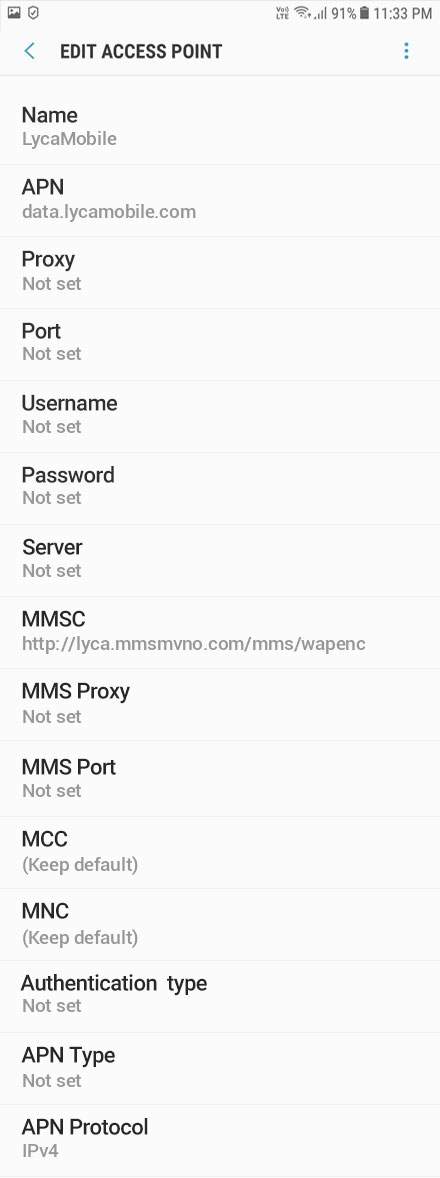
LycaMobile APN Settings:
- Name: LycaMobile
- APN: data.lycamobile.com
- Proxy: Leave it blank
- Port: Leave it blank
- Username: lmus
- Password: plus
- Server: Leave it blank
- MMSC: http://lyca.mmsmvno.com/mms/wapenc
- MMS proxy: Leave it blank
- MMS port: Leave it blank
- MCC: 311
- MNC: 96
- Authentication type: PAP
- APN type: default, supl, mms
- APN Protocol: Leave the default settings as it is
The final settings will look like something like this.